
TDA’s CACFP Intake Form is how the Texas Department of Agriculture registers a new applicant and starts its review. You complete it yourself — it asks for the contact person’s personal details, which we cannot supply on your behalf.
Before you start
The form has no save-and-resume option, so set aside enough time to finish it in one sitting. Have these ready:
- Your organization’s legal name as registered with the Texas Secretary of State, and your assumed name (DBA) if you use one
- Your physical street address — TDA asks for a physical address, not a PO box
- Your EIN and your Unique Entity ID (UEI), which is free from SAM.gov and takes about 10 minutes
- The number of sites you will operate
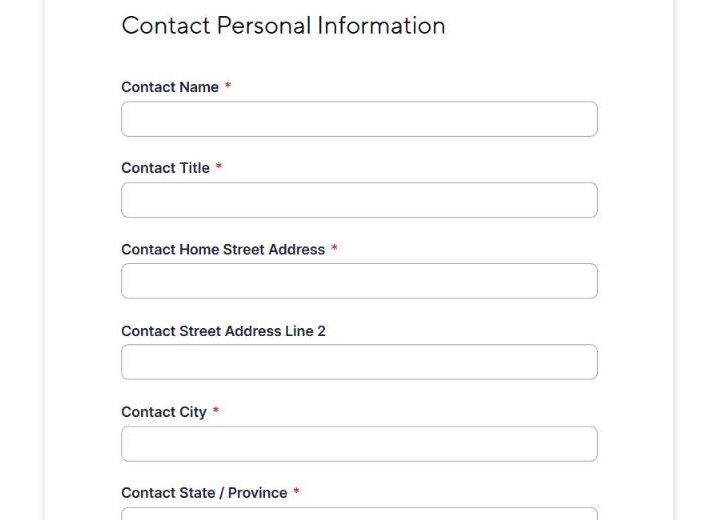
- The contact person’s home address, job title, and date of birth
No documents are uploaded on this form. Fields marked with an asterisk are required.
Step 1 — Open the form
TDA’s CACFP Intake Form opens in a web browser. No account, password, or payment is needed.

Step 2 — Your organization
Enter your legal name exactly as it is registered with the Texas Secretary of State. It needs to match your EIN letter, your SAM.gov registration, and the name on your TDA training certificate — mismatched names are one of the most common causes of delay.
Add your DBA only if you use one. If your organization is registered with the Secretary of State, the DBA must be registered and current there as well. For the address, give the physical location where you operate.
Step 3 — Applicant information
Most of this section is straightforward: type of agency, county, type of operation, number of sites, and your EIN. Three fields are worth a closer look.
- Request to Participate In. Choose Centers if you operate or sponsor child or adult day care centers, emergency shelters, or afterschool at-risk programs. Day Care Homes is only for sponsors of family day care home providers, and TDA requires 501(c)(3) tax exemption status for it.
- Contracting Entity Identification Number. Enter N/A. As a new applicant you do not have one yet.
- UEI Number. Your Unique Entity ID from SAM.gov. If you do not have one, get it first — the form cannot be submitted without it.
TDA notes on this section that background checks are completed for all applicants.
Step 4 — Contact person
This section asks for personal details, not business ones. The person you enter here should be the main person in charge of CACFP at your center — TDA treats this contact as the responsible person for the program and runs a background check on them, so it asks for that person’s home street address, job title, date of birth, phone number, and email, not the center’s.
Use an email address you check daily. Everything TDA sends from this point on goes there.
Step 5 — Eligibility questions
The last section is a set of yes-or-no questions about serious deficiency status, terminations for cause, debts owed to TDA, the National Disqualified List, the Texas Excluded SFSP List, and business integrity. The form defines each term directly above the questions.
Answer accurately — TDA checks these answers against its own records. If any answer is Yes, check with us before you submit.
The final question asks whether you have been operating for at least 12 months. TDA needs 12 months of financial records to review financial viability.
Step 6 — Before you submit
Tick Send me a copy of my responses at the bottom and enter your email address. That copy is your record of what you sent.
Review your answers first. TDA notes that inaccuracies will delay processing.
Step 7 — After you submit
Forward your emailed copy to help@cacfpsolutions.com so we can log your submission date.
TDA then emails you the Financial Viability form directly. There is no fixed timeline, so check your email daily, including spam, and forward anything from TDA to us. We prepare and submit that form with you — please do not complete it on your own.
Common questions
Can I save the form and come back to it?
No. There is no save-and-resume option, and closing the browser clears what you have entered.
What do I enter for the Contracting Entity Identification Number?
N/A. New applicants do not have one at this stage.
Whose home address and date of birth go on the form?
The contact person’s own, because TDA runs background checks on the responsible person named on the application.
What if I do not have a UEI yet?
Get one before you start — it is free and takes about 10 minutes. Our walkthrough is How to Get Your Unique Entity ID (UEI).
Do I upload any documents with this form?
No. Financial and business documents are collected separately, later in the application.
Questions
Email help@cacfpsolutions.com if any field is unclear or the form will not submit. TDA also lists (877) TEX-MEAL on the form for questions about the program.