

What’s TX-UNPS All About?
Hey there, CACFP admin! Are you currently responsible for using TX-UNPS for your CACFP contract management? Well, let’s chat about some simple, effective tips to make sure you’re taking full advantage of TX-UNPS.
Texas Unified Nutrition Programs System (TX-UNPS) is a web-based platform designed to facilitate the management of federal child nutrition programs (including the CACFP) in Texas.
It offers a way for the state agency to stay in communication with centers regarding tasks like CACFP applications, claims filing, compliance monitoring, and communication.
Navigating the TX-UNPS Learning Curve
Like any software platform, there is a learning curve.
But, no worries! With the right guidance and resources, you’ll find that navigating TX-UNPS can become a seamless part of your daycare operations.
Here at CACFP Solutions, we know the ins and outs of TX-UNPS, and we’re here to help. We’re experts in TX-UNPS, and we’re ready to lend a hand. That’s why, drawing from our experiences, we’ve put together a list of top tips that every CACFP contract manager using TX-UNPS should know.
So, without further ado, let’s dive right into the tips!
Tip #1 View Application Packet Section to Identify Issues
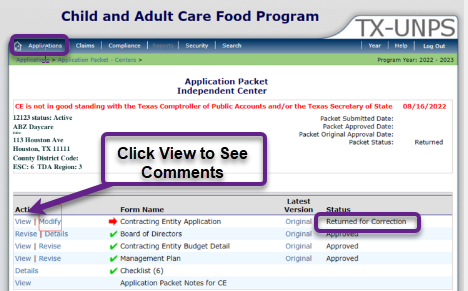
- Having trouble with your application in TX-UNPS? Here’s how to troubleshoot your application issue.
- First, log in and navigate to applications at the top of the page.
- Next, visit the application packet section to identify the problem area.
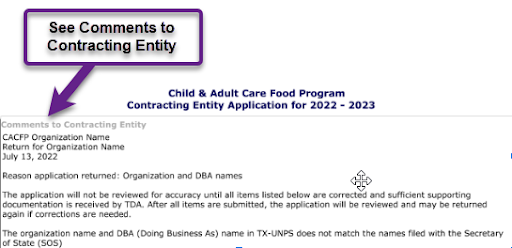
 Once you open a specific section, you’ll see the comment/warning message on the top of the page.
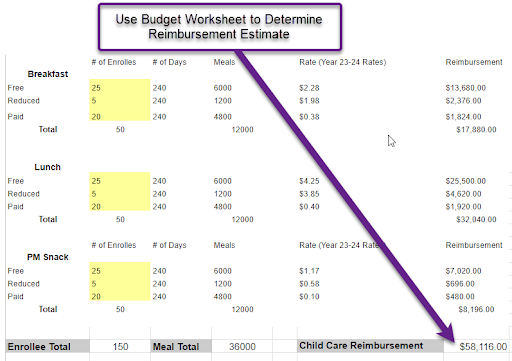
Tip #2 Use a budget worksheet to determine reimbursement estimates.
With this method, you enter the estimated number of enrollees in each category, and the spreadsheet will calculate your reimbursement.
TIP #3: Use a budget worksheet to determine operational and admin costs before you put them in TX-UNPS.
- The budget worksheet calculates the FICA rate, Medicare rate, and the portion paid for the food service account annually.
- It uses the base salary, number of hours worked, and the number of hours spent on food service duties.
- This makes it easy to transfer the information to the labor section in TX-UNPS.
- Need some help? Book a free call: https://cacfpsolutions.com/hourly-consultation/

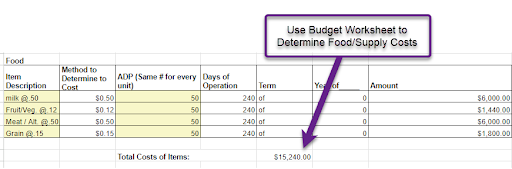
TIP #4: Use a budget worksheet to determine food and supply costs.
The worksheet uses average daily participation to estimate food and supply costs, making it easy to input the number into TX-UNPS.
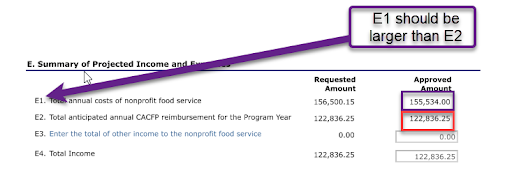
Tip #5: Verify program costs listed on line E1 of budget exceed program reimbursement as listed on E2.
To demonstrate that you will clear your food program expenses, program costs should exceed reimbursement in your CACFP budget.
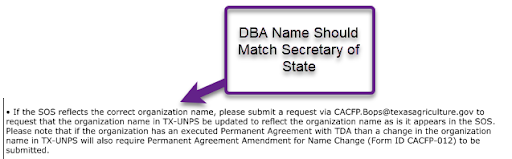
Tip #6: The DBA name in TX-UNPS should match the name filed with the Secretary of State (SOS).
- Ensure that your “Doing Business As” name matches the Secretary of State name exactly.
- Any inconsistencies will require you to resubmit your application and possibly submit a copy of your assumed name certificate. To update the organization name, send an email to CACFP.Bops@texasagriculture.gov.
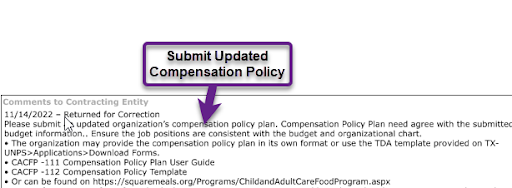
Tip #7: Ensure you submit an updated compensation policy.
Your compensation policy should outline your organization’s policies and align with the submitted budget and organizational chart. For a sample compensation policy, please refer to this template from Squaremeals.
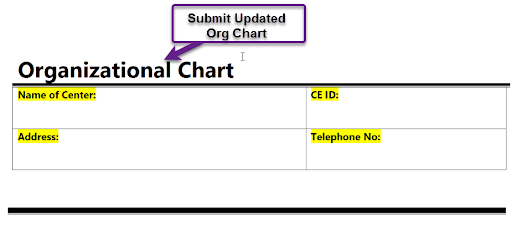
Tip #8: Make sure to submit an updated organization chart.
Additionally, make sure the org chart is congruent with your budget & compensation policy. To view a sample organizational chart, please click here.
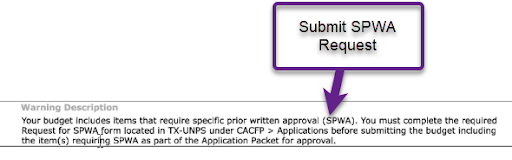
Tip #9: Ensure you submit a Specific Prior Written Approval (SPWA) request if you have items on your budget requiring it.
SPWA is required for costs which are not typically incurred in the routine operation of the CACFP. You must complete the required request for the SPWA form located in TX-UNPS under CACFP>applications before submitting the budget.
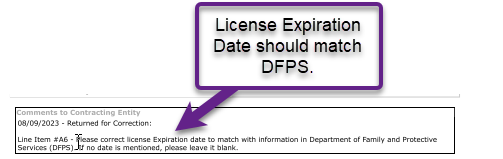
Tip #10: Confirm your license expiration date entered in TX-UNPS matches the information from the Department of Family and Protective Services.
If these numbers don’t match, your application or renewal application may be returned.
Wrapping Up
So there you have it! A few friendly pointers to help you make the most of TX-UNPS for your CACFP contract management. Remember, it’s all about getting comfortable with the system and utilizing all the resources available to you.
Still Have Questions? CACFP Solutions is Ready to Lend a Hand
If you face any challenges or need more personalized guidance regarding your CACFP contract management, feel free to reach out to CACFP Solutions.
Our team of experts has over 30 years of experience with CACFP and extensive knowledge of TX-UNPS. We provide individualized support to help you maximize the use of TX-UNPS for your daycare! Schedule a free consultation today and let CACFP Solutions empower you to streamline your operations and focus on what matters most!